Width and height
GEOMETRYRELAY FOR MAC
Stop rebuilding PowerPoint shape settings.
Copy a reference shape, choose the size, position, or style you need, and apply only those properties to another shape.
$2One-time purchase · Keep your version · One Mac
Buy nowPay with Polar to get the Mac app and license key right away.
COPY · SELECT · APPLY
Copy. Choose. Apply.
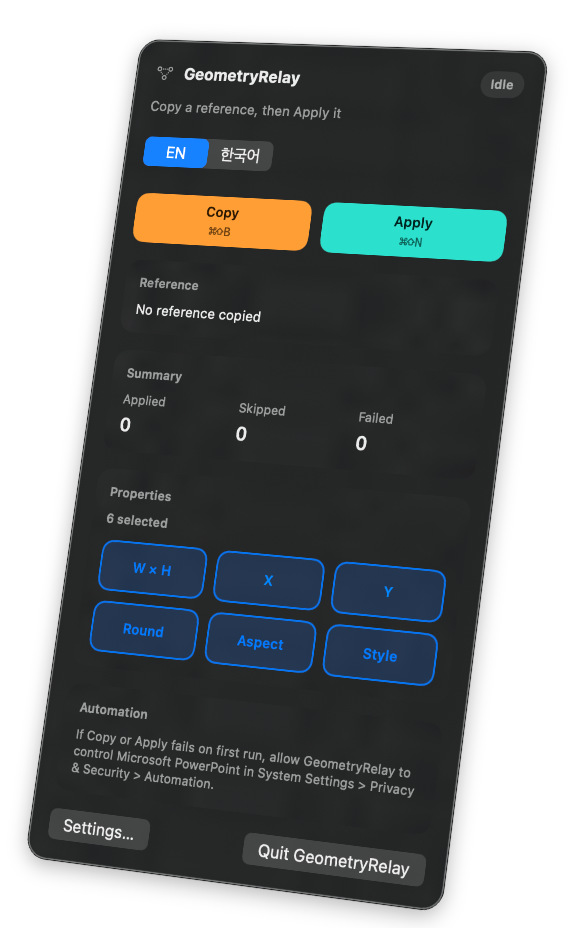
Copy a reference shape, select the properties you need, and apply them to the target shape.
Read the demo transcript
- Select a reference shape in PowerPoint and copy it.
- Choose only the properties you want.
- Select a target shape and apply them.
Copy only what you need
Match size and position, or transfer only the style.
Left and right position
Up and down position
Shape corner radius
Picture and shape proportions
Fill, line, arrowheads, and picture border
Shapes, lines, arrows, and pictures
Size, position, corners, fill, and outline
Length, position, line appearance, and arrowheads
Size, position, aspect, border, and crop
Connected connectors keep their connections and are excluded from position and Style transfer.
Buy once. Keep your version.
Use the version you purchased without a subscription.
$2One-time purchase · Keep your version · One Mac
- Apple Silicon
- macOS 14+
- Microsoft PowerPoint
PowerPoint content stays on your Mac. Internet access is used only for license activation and periodic validation.
- Checkout with PolarPay once on Polar's secure checkout page.
- Download the Mac appGet the Apple-notarized GeometryRelay installer.
- Activate your licenseUse the license key to activate one Mac.
Frequently asked questions
Choose from size, position, corners, fill, and outline for general shapes; length, position, line appearance, and arrowheads for lines and arrows; and size, position, aspect, border, and crop for pictures. Position and Style transfer are not supported for connected connectors.
Polar provides the GeometryRelay installer for Mac and your license key.
Open the downloaded DMG, move GeometryRelay to Applications, and launch it.
Yes. Deactivate the old Mac in the Polar customer portal, then activate the new one. Only one Mac can be active at a time.
After activation, you can use it offline for 30 days. License validation is then required, with a 15-day grace period when a connection is unavailable.
Refunds follow Polar's checkout terms and applicable law. A full refund revokes download and license access.
Finish PowerPoint shape work faster.
Copy only the properties you need and stop re-entering the same settings.
$2 · One-time purchase · One Mac
Buy now